
Unified Practice vs Qihuang AI: Built for Acupuncture, but You Fill In Every Field
Pure Digits Inc. · Updated · 8 min read
Short answer
Unified Practice is a long-standing acupuncture EHR with a full front-desk toolset, and cash-pay clinics already settled on it can stay. Its notes are filled in by hand field by field, with no AI features or Chinese interface seen in our trial (as of October 2026), and connecting to Office Ally takes its top plan; clinics with many insurance patients that want less typing can look at Qihuang AI.
The short answer: who should stay, who should switch
Unlike Jane, Unified Practice was built for acupuncture clinics from the start. Its notes have fields for tongue, pulse, channels and channel palpation, and its treatment plans are split into acupuncture, external therapies and herbs. The problem isn't that it doesn't understand acupuncture. The problem is that everything is manual: the practitioner types every field in English and looks up every code.
Unified Practice is a fine fit if your clinic
- Sees mostly cash-pay patients and mainly uses it for scheduling, payments, product sales, packages and inventory.
- Has used it for years, with note templates and fee schedules already set up and a team that knows it well.
- Already takes cards through UnifiedPay and gets its lower plan prices.
Consider Qihuang AI if your clinic
- Sees a lot of insurance patients. Unified Practice only includes insurance billing from the $74 plan up, and connecting to Office Ally takes the top $99 plan. Without UnifiedPay, those two plans cost $114 and $152.
- Has practitioners who type slowly or aren't comfortable in English. Tongue, pulse, chief complaint and treatment principle are all typed in English, and the software has no Chinese.
- Wants AI to help write notes and pick codes. We saw no AI features in our trial, so you would need a separate third-party tool.
- Has no one on staff who knows billing. Unified Practice doesn't do billing itself; it lists third-party billing partners such as AcupBilling, which you would contract separately.
We tried it end to end: every field is yours to fill
We signed up for a Unified Practice free trial, created a test patient, and went from writing the note all the way to building a claim. All the screenshots below come from that trial account.
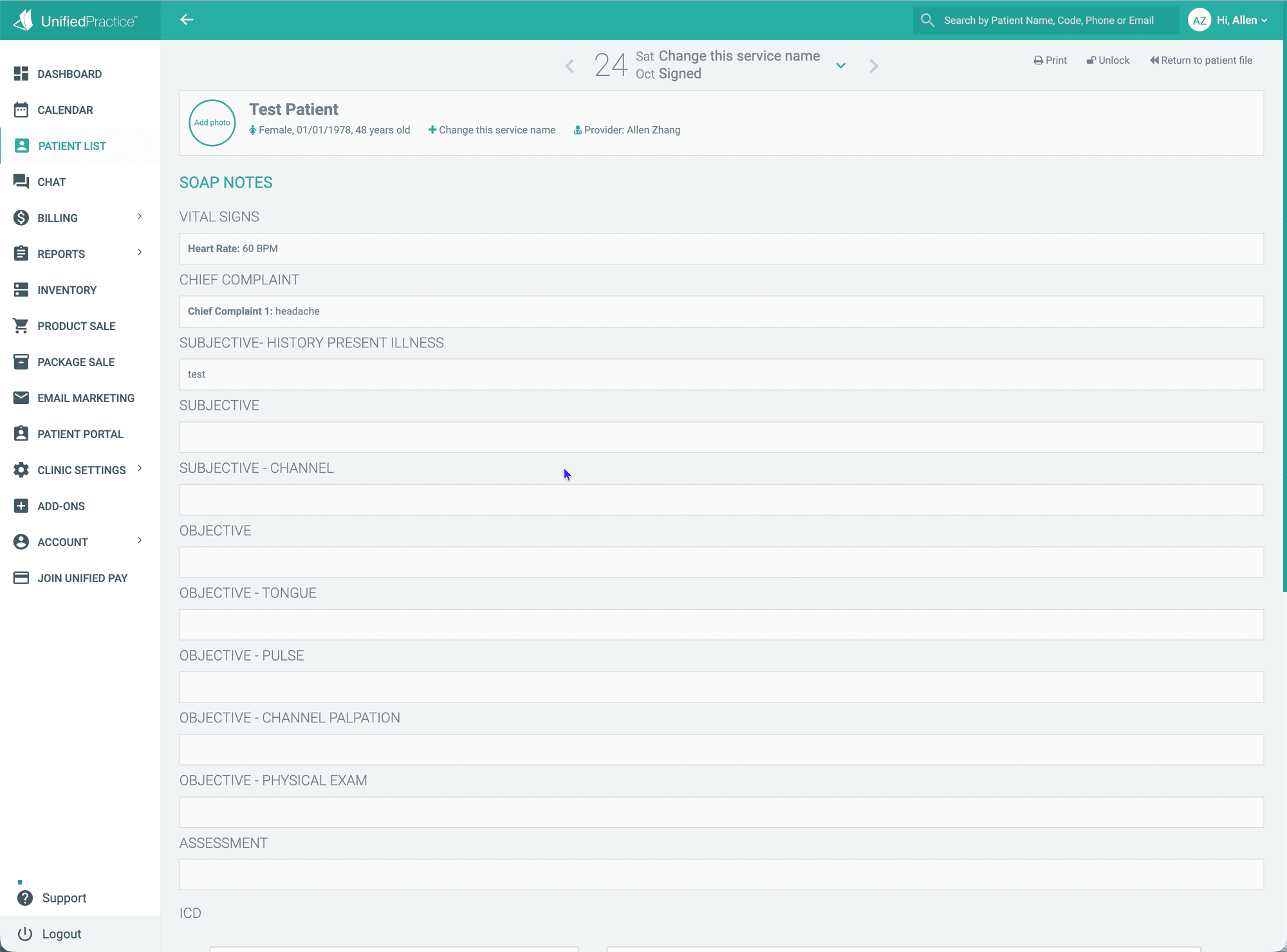
The four examinations: tongue and pulse are blank boxes
The note page is laid out the way a TCM practitioner thinks: chief complaint, history of present illness, channels, tongue, pulse, channel palpation, physical exam and assessment. But each one is a blank text box. “Pale tongue, white coating” or “wiry, thin pulse” has to be typed out in English by the practitioner. There are no options to click.
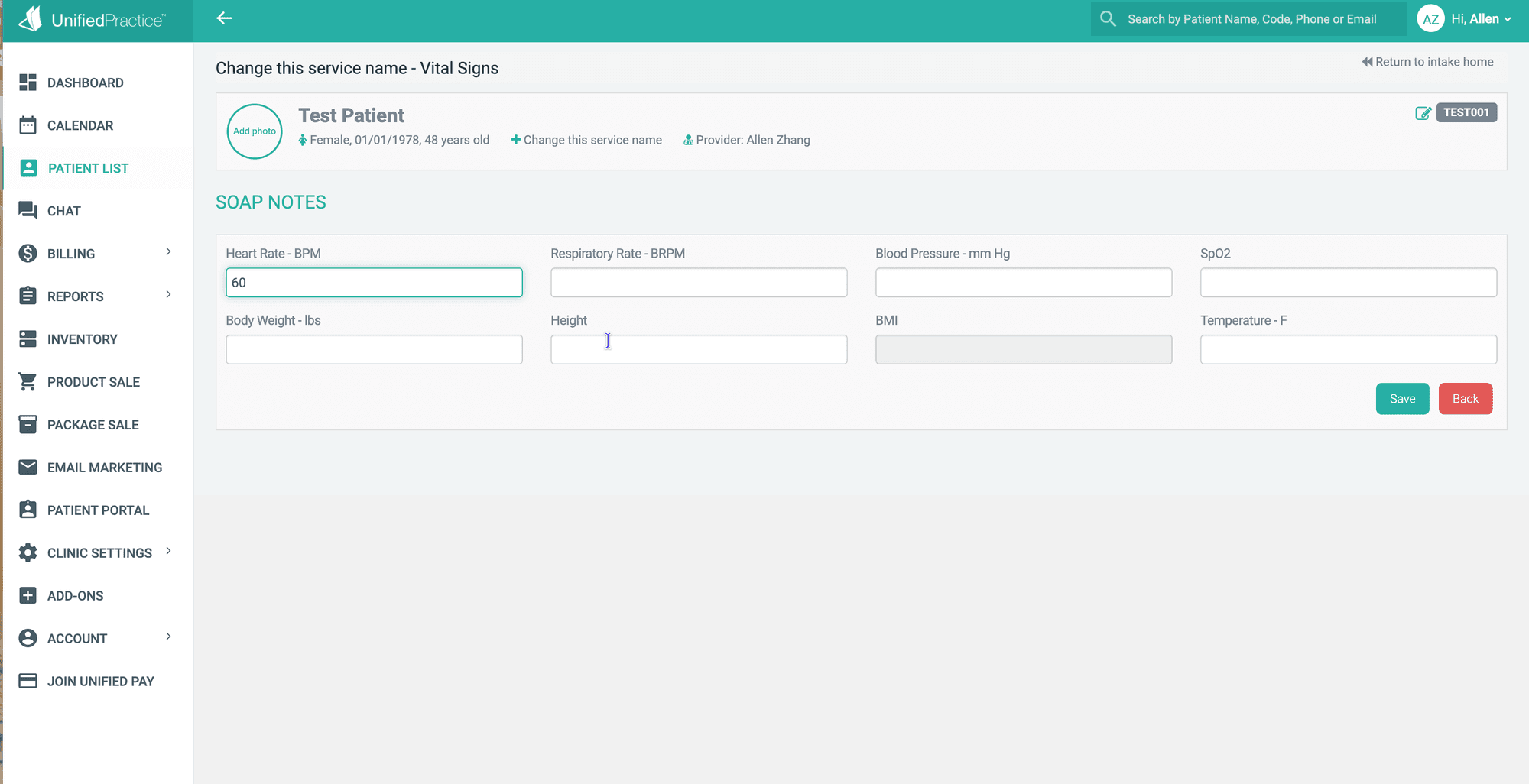
Each section also opens on its own page. For vital signs, for example, you open the page, fill it in, click Save, click “Return to intake home” to get back to the note, then open the next section.
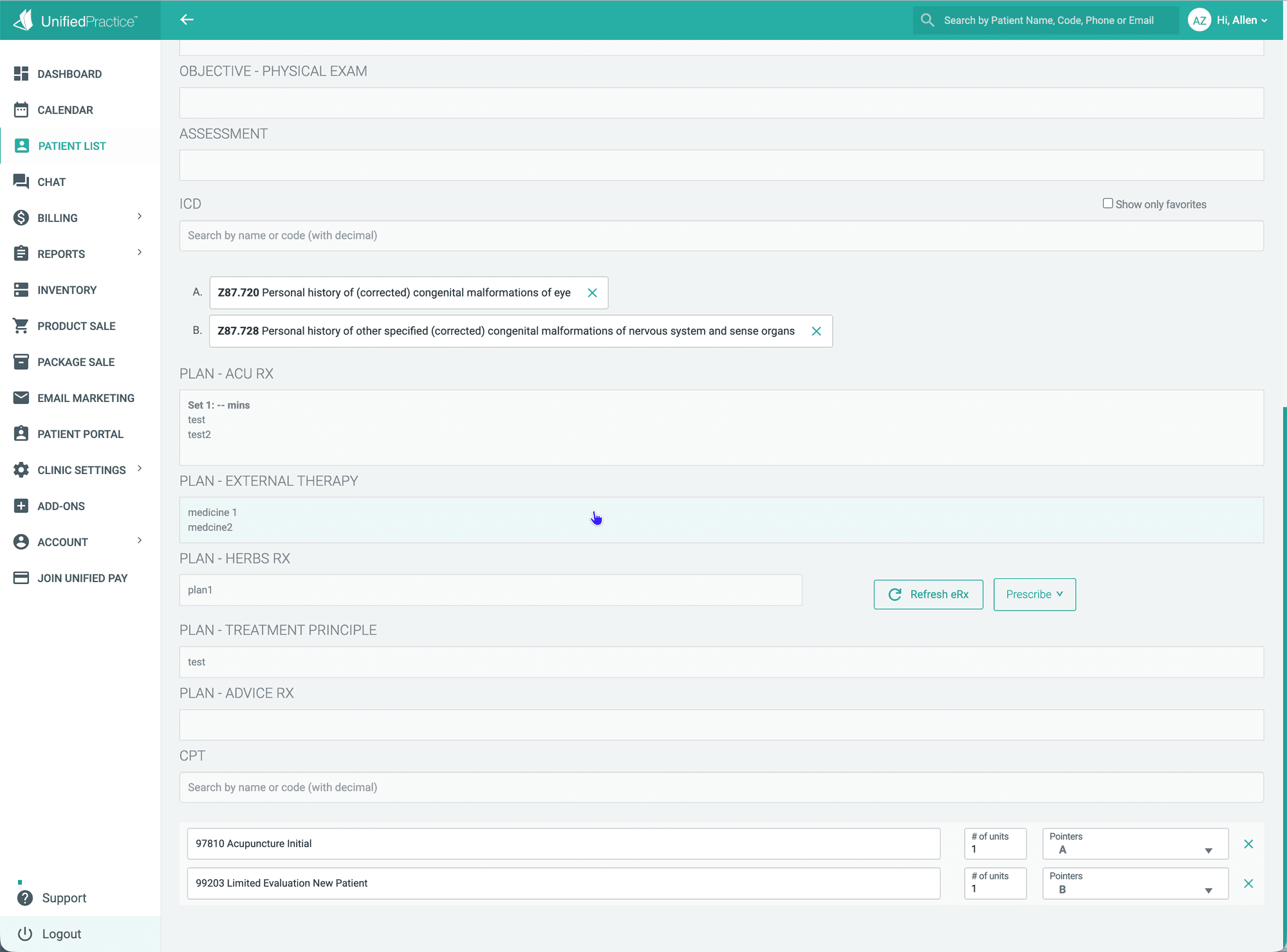
Codes: you search for them in English
ICD and CPT are each a single search box labeled “Search by name or code (with decimal)”. You need to know what term to search and which code to pick. The acupuncture prescription (ACU RX), external therapies and treatment principle are plain text boxes too, written by you.
Charges and claims: electronic submission takes the top plan
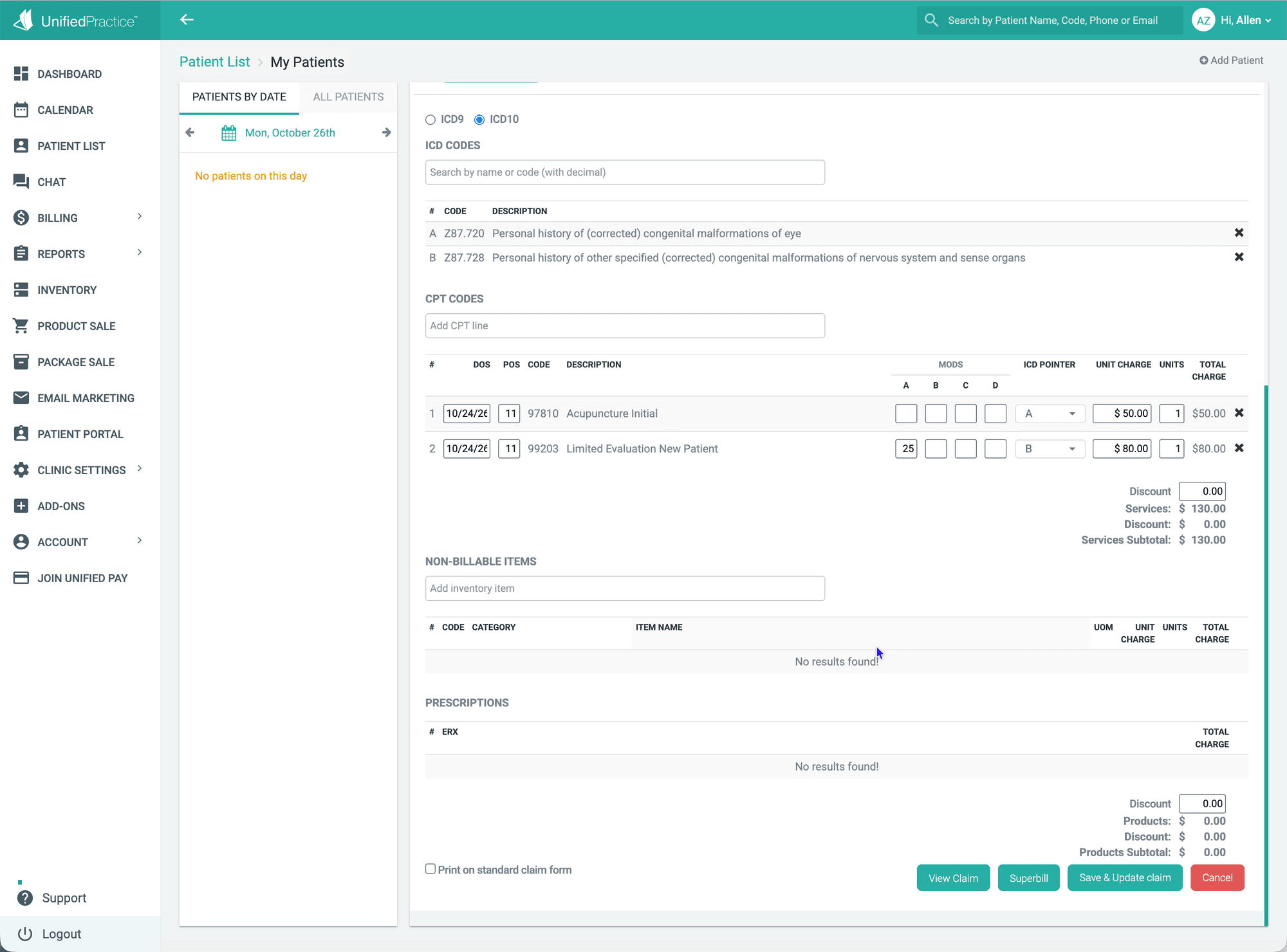
On the billing page, the ICD and CPT codes picked in the note carry over automatically. Date of service, place of service code and unit price have defaults. You still check each line yourself and add modifiers (such as 25). Claim status is a dropdown; in our trial it sat at “Claim created”.
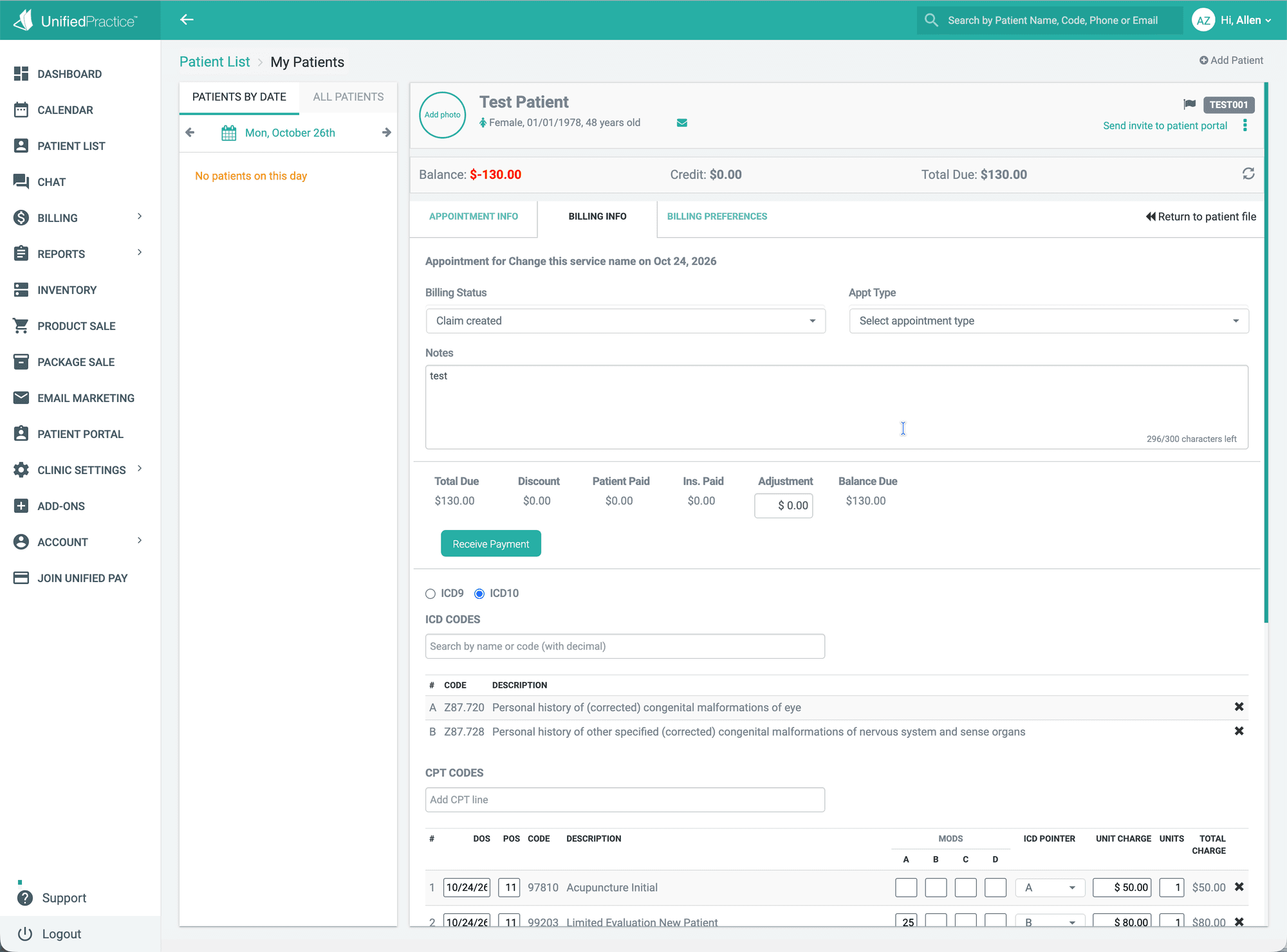
At the bottom of the page are the buttons “Print on standard claim form”, View Claim, Superbill and Save & Update claim. There is no electronic submission button on the claim page. To submit electronically, you need the top Premium plan. Each practitioner first requests a file upload account from Office Ally and enters it in the system. Then you go to the claims list, check the claims and click upload, and the system sends the claim file to Office Ally. On the other plans, you can only print the claim form and mail it, or log in to the Office Ally website and enter the claim again. Once a claim goes out, its help docs don't say whether acceptance, denials or payment amounts come back into the system automatically.
The same workflow in Qihuang AI
Qihuang AI takes the opposite approach. If something can be clicked, you don't type it. If AI can fill it in first, it does. The practitioner reviews and edits.
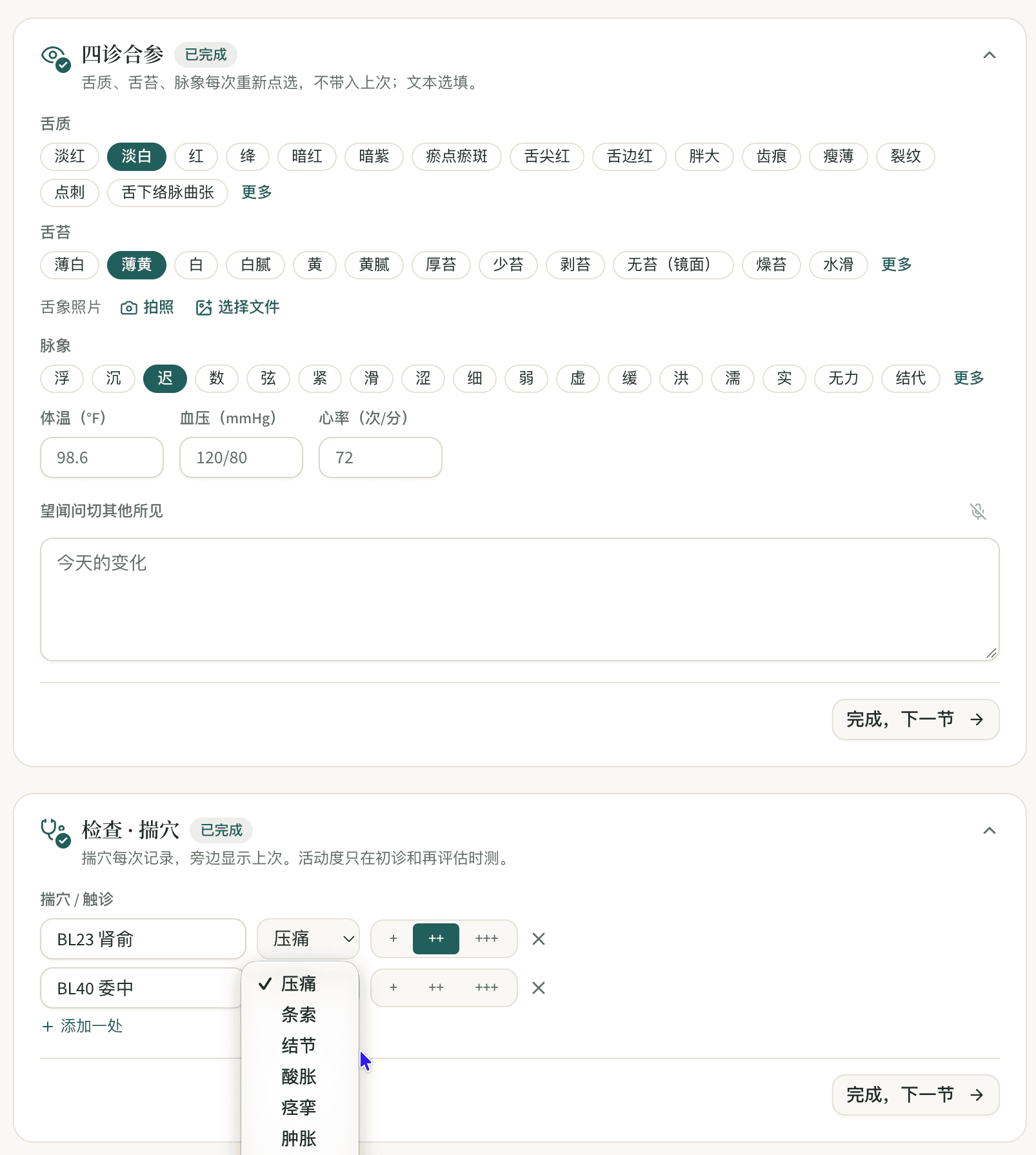
- Four examinations: tongue body, tongue coating and pulse are rows of options you click. You mark pain locations on a body chart and score them 0–10. It's all on one page, with no going in and out.
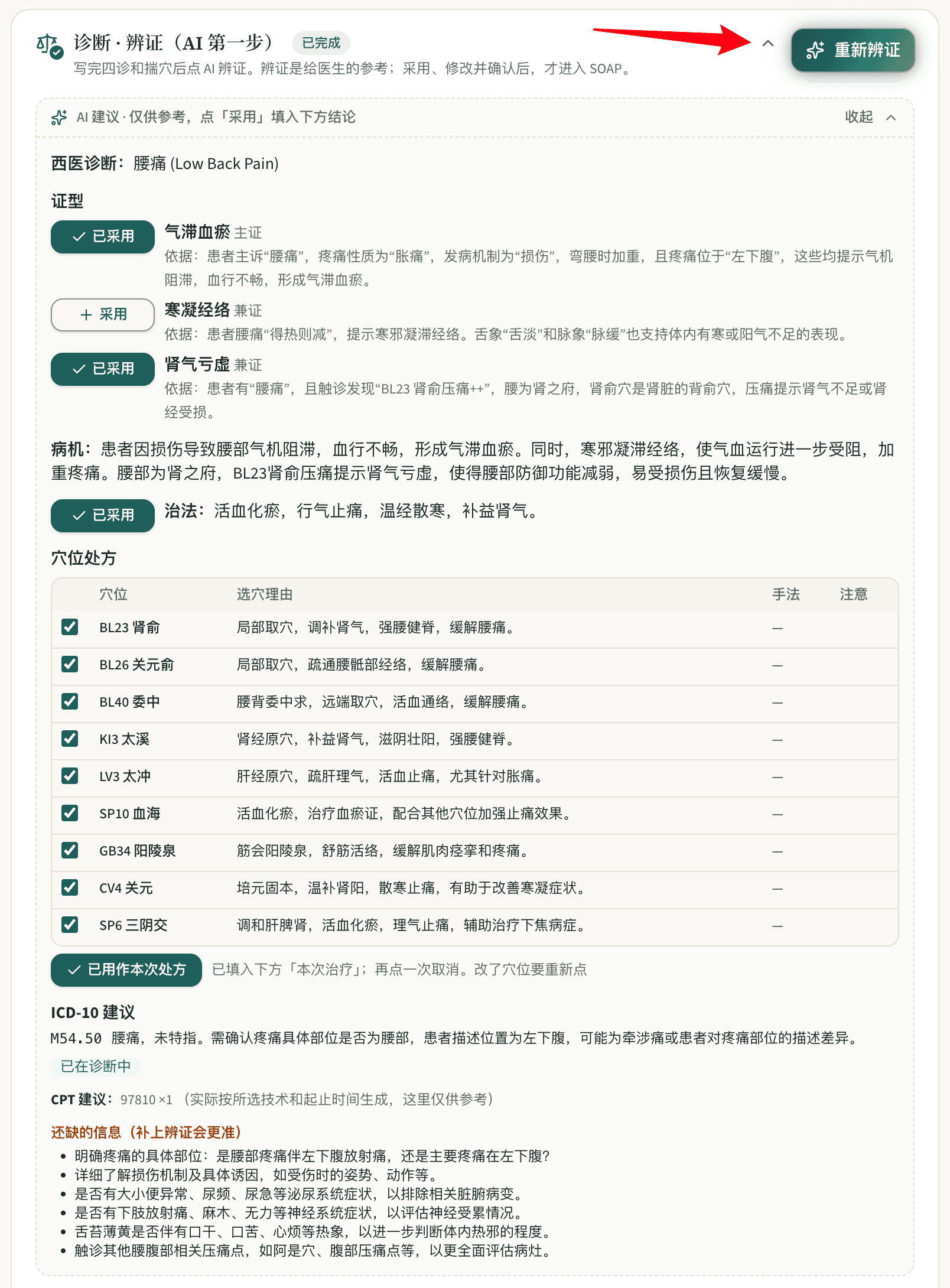
- Pattern differentiation and treatment plan: once the exam is filled in, one click gets AI's suggested pattern with its reasoning, treatment method and point prescription. Nothing counts until the practitioner clicks “Accept”.
- Codes: clicking a condition fills in the ICD-10 code. AI also suggests CPT codes and checks that treatment time matches the units billed.
- Notes: AI writes an English SOAP note from what you clicked, structured to common payer documentation requirements, and flags anything payers need that is missing. The practitioner reviews it before submitting.
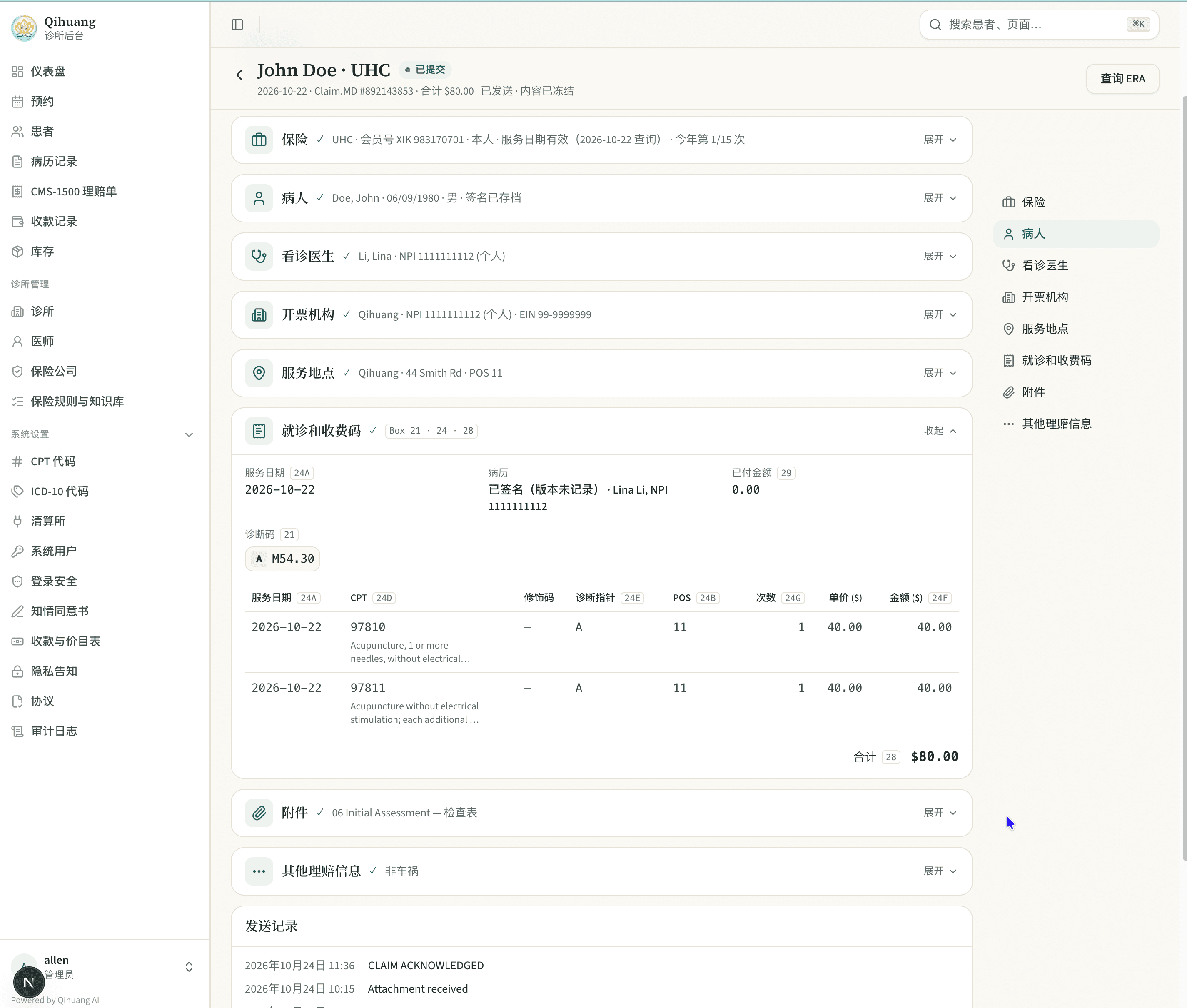
- Claims: the CMS-1500 is generated straight from the note and submitted through Claim.MD in one click. The submission history and the remittance details (ERA) live on the same claim.
Which Unified Practice plan do you need for insurance billing?
| Plan | With UnifiedPay | Without UnifiedPay | Insurance billing | Staff accounts |
|---|---|---|---|---|
| Starter | $49/mo | $74/mo | Invoices and superbills only, no insurance claims | 1 |
| Enhanced | $74/mo | $114/mo | Adds Insurance Claims | 5 |
| Premium | $99/mo | $152/mo | Adds the Office Ally integration | Unlimited |
Each additional practitioner adds $32/month on Starter and $38/month on Enhanced and Premium.
To be honest, on monthly fees alone Unified Practice isn't expensive. If you already take cards through UnifiedPay, Premium is $99/month plus Office Ally fees. Qihuang AI self-serve software is $69/month, plus about $60/month for Claim.MD, for a total of about $129/month.
But keep three things in mind. First, $99 is the price when you use UnifiedPay; without it, Premium is $152. Second, we saw no AI features in our trial (as of October 2026), so AI-written notes mean buying a third-party tool. Third, the money saved on the monthly fee is paid back in extra typing for practitioners every day and extra fields for the front desk on every claim. Qihuang AI's $69 already includes insurance billing, and each practitioner gets a free monthly AI allowance: 100 AI-generated SOAP notes, 100 AI pattern differentiations, 100 AI pre-signature checks and 60 minutes of voice dictation. Beyond that, SOAP notes are $0.20 each, pattern differentiation and pre-signature checks are $0.10 each, and voice is $0.05 per minute.
No Chinese, and no billing service of its own
Unified Practice's interface and notes are in English, and its website doesn't mention Chinese. Qihuang AI's interface switches between Simplified Chinese, Traditional Chinese, English and Korean. Practitioners can also dictate the four examinations and chief complaint in Mandarin, and the system turns that into clinical note language.
Unified Practice doesn't bill claims itself; it lists third-party billing partners such as AcupBilling. Unless you hire one, denied claims, follow-up and reconciliation are the clinic's job. Besides self-serve software, Qihuang AI offers full-service billing: we handle coding, submission, follow-up, fixing denials and reconciling payments. The fee is 7% of what insurance actually pays, with a $299/month minimum, and the full system is included. If insurance pays less than about $4,271 in a month, you pay the $299 minimum.
To be fair, what Unified Practice does well
- Truly built for acupuncture: notes have tongue, pulse, channel and channel palpation fields, and treatment plans are split into acupuncture, external therapies, herbs, treatment principle and patient instructions.
- A full front desk and operations toolset: inventory, product sales, packages, a patient portal, email marketing and website live chat, all in one system.
- Electronic herbal prescribing: the note has an eRx button.
- A reference library: from the Enhanced plan up, it includes expanded Matt Callison materials and a Materia Medica library.
- You can try it first: there is a 7-day free trial.
If most of your patients pay cash and you rely on these front-desk features, Unified Practice is still a solid choice. Qihuang AI's front-desk features are leaner. If there's something it doesn't have yet, clinics can ask for it and we build it to fit the clinic's needs.
Before you choose, run the same patient through both
Both are free to try: Unified Practice has a 7-day trial, and you can book a Qihuang AI demo. Here's how we suggest comparing them:
- Make up a new patient with low back pain and write a complete note in each system: four examinations, pattern differentiation, treatment plan and codes. Time it.
- Have the slowest typist among your practitioners do it, and see whether they can get through it.
- Then build the claim, and count how many fields you fill in yourself and whether you have to leave the system to upload it on another website.
What to watch for when switching from Unified Practice
- Finish old claims in the old system: claims already submitted but not yet closed stay in Unified Practice and Office Ally until they're resolved. New visits are submitted from Qihuang AI, so nothing is filed twice.
- Export your data first: export patient records and past notes, and store them as HIPAA (the U.S. health privacy law) requires.
- Start clearinghouse enrollment early: moving from Office Ally to Claim.MD means redoing electronic claim and ERA (electronic remittance advice) enrollment with each payer, and some take weeks. Keep the old account open until every enrollment is done. You can open the account and handle enrollment yourself (we provide a step-by-step guide), or have us do it, free with an annual plan.
Unified Practice vs Qihuang AI at a glance
| Unified Practice | Qihuang AI | |
|---|---|---|
| What it is | Acupuncture-specific EHR and practice management | Built for acupuncture and TCM clinics, focused on notes and insurance billing |
| Four examinations | Tongue, pulse and channels are blank text boxes you type into in English | Click to select tongue, coating and pulse; mark and score areas on a body chart |
| AI | No AI features seen in our trial (October 2026) | AI pattern differentiation, AI-written English SOAP notes and code suggestions; each practitioner includes an allowance |
| Claim codes | Search ICD and CPT yourself in English | Clicking a condition fills in ICD-10; AI suggests CPT |
| Insurance billing | Only from Enhanced ($74 and up); uploading to Office Ally needs Premium ($99 and up), with claims checked and uploaded by hand from the claims list | Included at $69, submitted directly through Claim.MD |
| After submission | Help docs don't say acceptance, denials or payments come back into the system automatically | Usually shortly after sending, you see whether Claim.MD accepted or rejected it; remittance details (ERA) pull onto the claim with one click |
| If you don't use their card processing | Monthly fee is $25–$53 higher | No tie-in |
| Each added practitioner | +$32 or +$38 | +$39, with a free AI allowance included |
| Staff accounts | 1 / 5 / unlimited (by plan) | Separate roles for admin, billing and front desk |
| Interface language | English | Simplified Chinese, Traditional Chinese, English, Korean |
| Someone to file claims for you | Not itself; lists third-party billing partners such as AcupBilling | Yes, 7% of what insurance actually pays |
| Front desk and operations | Very complete: inventory, products, packages, email marketing, patient portal | Leaner; can be customized to the clinic's needs |
| Trial | 7 days free | Book a demo |
Information as of October 2026. Check each company's website for current pricing. Screenshots are from our trial account in October 2026.
Frequently asked questions
- Which Unified Practice plan includes insurance billing?
- Insurance Claims starts with the Enhanced plan: $74/month with UnifiedPay, $114/month without. The Office Ally integration is only on the Premium plan: $99/month with UnifiedPay, $152/month without.
- Does Unified Practice use AI to write notes?
- We saw no AI features in our October 2026 trial account; you fill in the notes yourself. Qihuang AI has AI pattern differentiation, AI-written English SOAP notes and code suggestions, and each practitioner gets a free monthly AI allowance.
- Does Unified Practice have a Chinese interface?
- We didn't see one. Its interface and notes are in English. Qihuang AI supports Simplified Chinese, Traditional Chinese, English and Korean, and practitioners can dictate the four examinations and chief complaint in Mandarin.
- Is Unified Practice cheaper than Qihuang AI?
- It depends. If you take cards through UnifiedPay, Unified Practice Premium is $99/month plus Office Ally fees. Qihuang AI self-serve software is $69/month plus about $60/month for Claim.MD. But without UnifiedPay, Unified Practice is $152/month, showed no AI features in our trial, and notes are filled in by hand field by field.
- If I switch from Unified Practice to Qihuang AI, what happens to my old claims?
- Claims already submitted but not yet closed are finished in Unified Practice and Office Ally, and new visits are submitted from Qihuang AI. Moving to Claim.MD means redoing electronic claim and ERA enrollment with each payer, so keep the old account open until then.
- Can I hand off insurance billing to Qihuang AI instead of doing it myself?
- Yes. Full-service billing costs 7% of what insurance actually pays, with a $299/month minimum. We handle coding, submission, follow-up, fixing denials and reconciling payments, and the full system is included.
Sources
- Unified Practice pricing page (plans, additional practitioners, staff accounts)
- Unified Practice homepage
- Unified Practice billing features page
- Unified Practice help center: submitting claims to Office Ally
- Unified Practice help center: adding an Office Ally account for each practitioner
- Claim.MD pricing page
General information only, not legal, coding or billing advice. Payer policies and contracts vary and change; verify with the payer, your MAC, or a qualified advisor.
Jane, AcuBliss, Unified Practice, AcupBilling, Claim.MD and other product names mentioned here are trademarks of their respective owners. Qihuang AI is not affiliated with or endorsed by them. Prices and features are as observed on the dates noted; screenshots are from trial or demo accounts, for comparison only.