
Is Jane App the right fit for your acupuncture clinic?
Pure Digits Inc. · Updated · 11 min read
Short answer
We don't recommend Jane for brand-new clinics, or for clinics with many older practitioners who type slowly or are more comfortable in Chinese than English. Established clinics already comfortable with Jane can stay; growing clinics that want to cut costs per practitioner can consider switching to Qihuang AI.
New clinics not yet on Jane: five cases where we don't recommend it
1. Small clinics that are just getting started
- It takes time to learn. We tested it ourselves: someone who had never used Jane went from creating a patient all the way to a finished claim, asking an AI assistant plenty of questions along the way, and it took about 40 minutes. That was a single internal test by one first-time user, not an efficiency comparison. The tester was a software developer. A practitioner opening a first clinic might take longer. Jane gets easier once you're familiar with it; the start is the hard part.
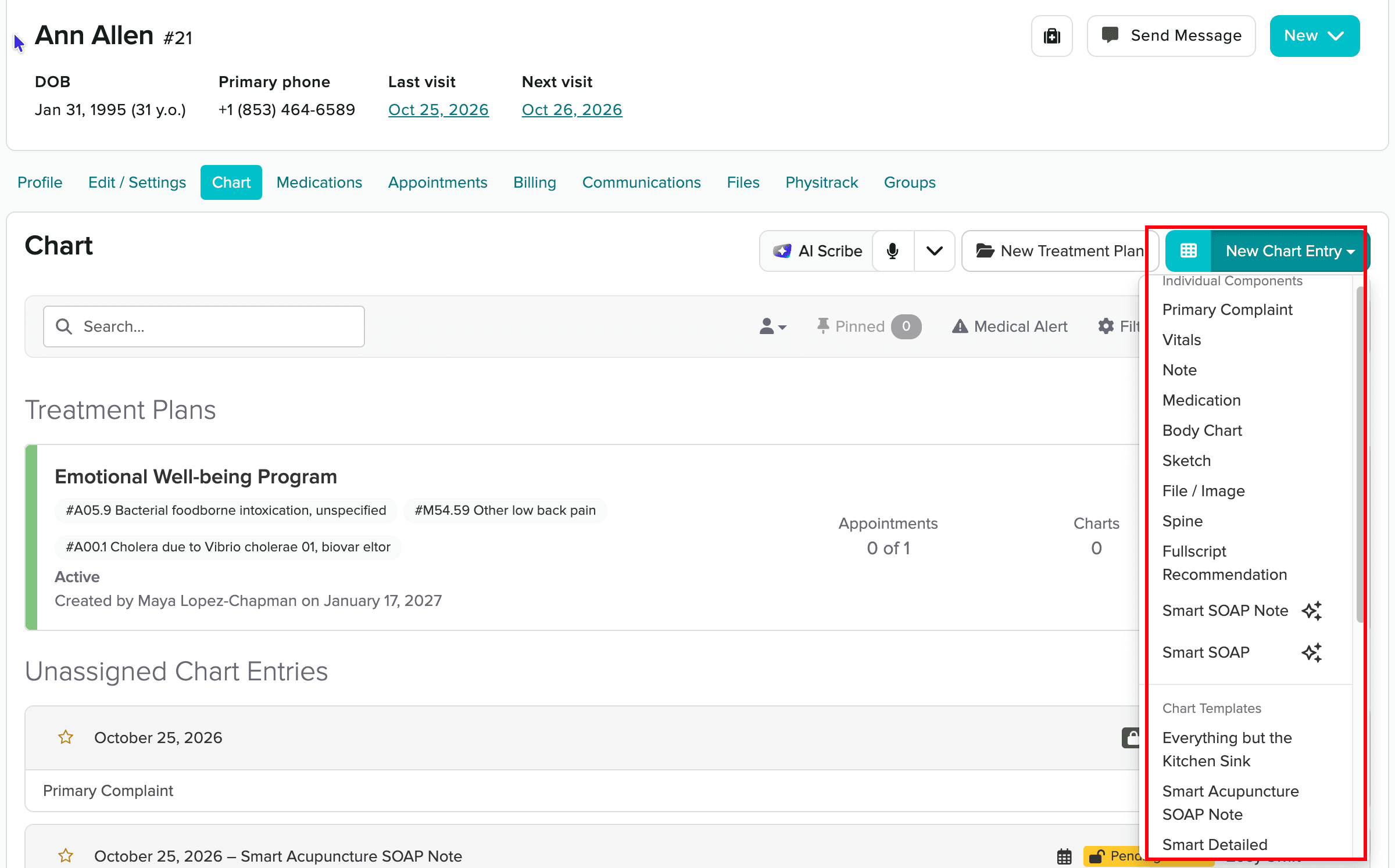
- So many features that it's hard to find things. Jane is general-purpose software for many kinds of clinics: massage, chiropractic, physical therapy, counseling and more. It does a lot. The cost is that new users often don't know where to click. The “New Chart Entry” button alone opens a menu with nearly 30 options.
- Lots of add-on fees. On top of the base monthly fee, insurance billing costs extra (from $20/month), AI charting costs extra ($15/month per practitioner), a clinic website costs extra ($59/month), and every added practitioner costs extra. Added up, that is real money for a small clinic.
2. Clinics with many older practitioners who type slowly or aren't comfortable with computers
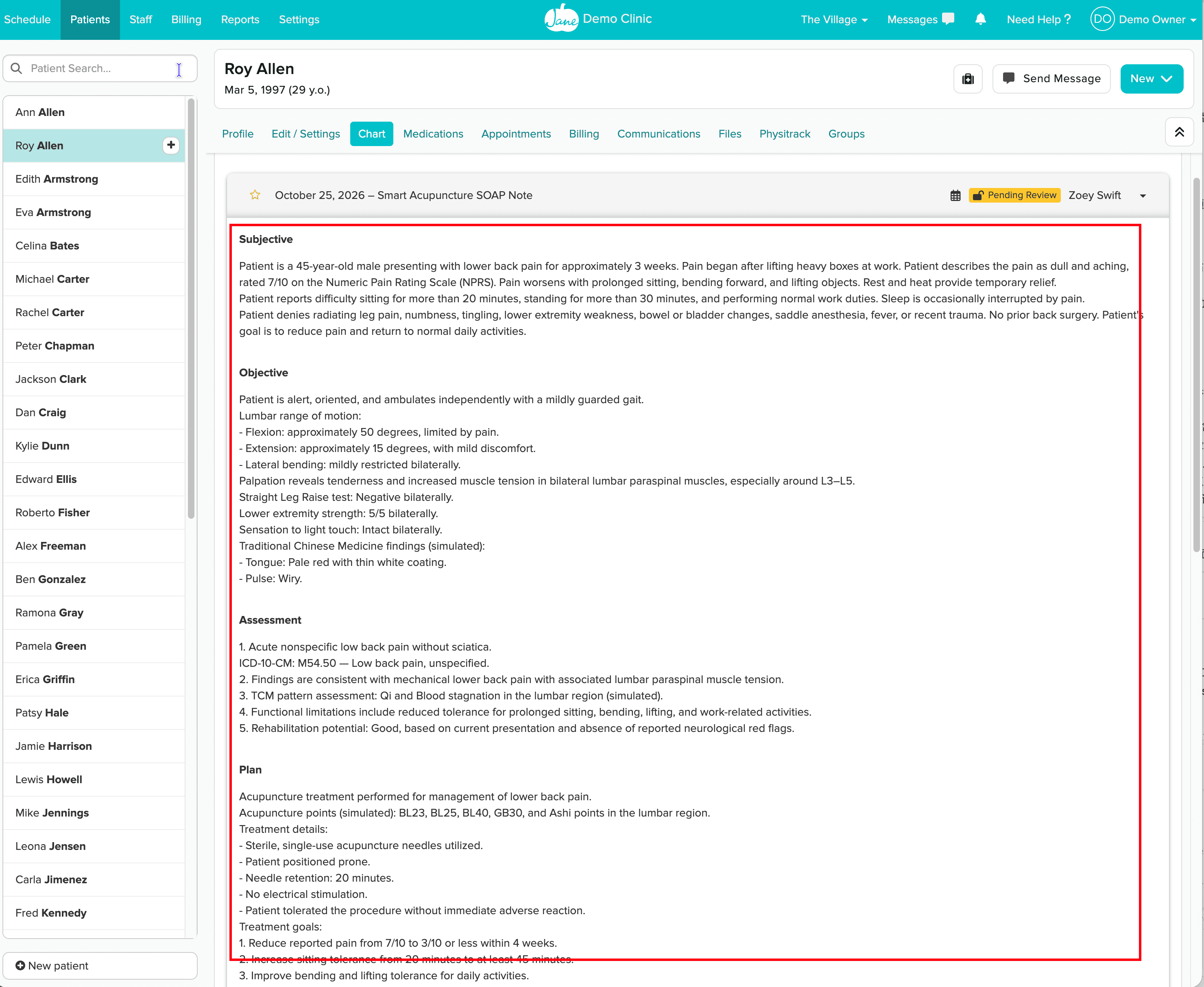
Jane's AI Scribe can record a visit and draft a SOAP note, but it officially supports English transcription only. Even in English, the AI produces long paragraphs of English notes that the practitioner still has to read and edit line by line.
3. Practitioners or front desk staff who are more comfortable in Chinese than English
Jane's interface has no Chinese option. From scheduling to charting to billing, every button and every prompt is in English.
4. Clinics that aren't tech-savvy and want an acupuncture-specific system that works out of the box
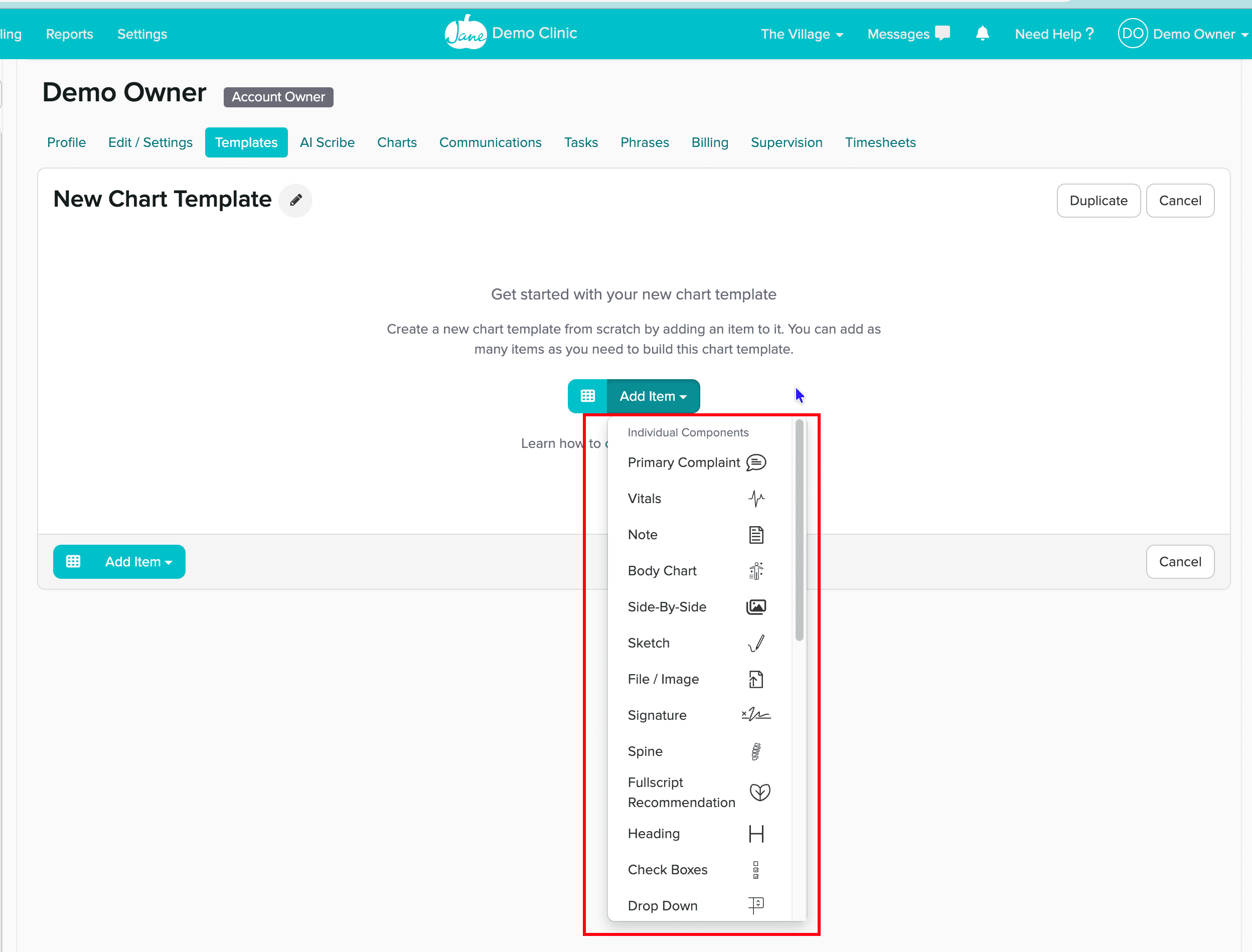
Jane is general clinic management software. It does have an acupuncture SOAP template, but to adapt it to how your clinic writes notes, you build it piece by piece in its template tool: primary complaint, vitals, body chart, checkboxes, dropdowns, and so on. That takes some computer skill.
5. Practitioners who aren't familiar with ICD-10 and CPT codes
In Jane, the practitioner adds billing codes by typing “#” in the chart and searching by English keyword. The AI-written note sometimes includes a diagnosis code, but that is just a line of text in the note. It doesn't become a code on the claim. Treatment CPT codes also have to be picked by hand.
Clinics already on Jane: when should you switch?
If you've used Jane for years, your templates are set up the way you like, and your team is comfortable with it, stay. You'll work just as efficiently. We do suggest switching in two cases:
- Most patients don't book through Jane. If patients mainly book through your own website, Zocdoc or elsewhere, you aren't getting much from Jane's strongest feature, online booking. You're paying for something you don't use.
- You're adding practitioners and want to keep costs down. Each practitioner you add in Jane means another practitioner license fee, plus $5 for the insurance add-on, plus $15 for AI. The more practitioners, the faster the bill grows.
Who Qihuang AI is for, and where it's strong
- New clinics: you can choose full-service billing, which includes the software, a clinic website and insurance credentialing. We take on the hardest parts of a clinic's first year with you.
- Clinics with several practitioners: each added practitioner is only $39/month, and every practitioner comes with a free AI allowance.
- Older practitioners, and practitioners more comfortable in Chinese than English: tap where you can, speak where you can, type as little as possible. The interface switches between Simplified Chinese, Traditional Chinese, English and Korean.
- Practitioners who aren't used to writing English SOAP notes: tap choices in Chinese, and the AI writes an English SOAP note structured to common payer documentation requirements; the practitioner reviews it before submitting. That saves time spent writing notes in English.
- Clinics new to insurance billing: no looking up codes yourself. The claim form is built from the chart, sent with one click, and the payment shows up on the same claim.
- Clinics planning to grow: Qihuang AI can be customized further to fit a clinic's needs. As you add practitioners or open new locations, the system grows with you. Extra clinics on the same account cost nothing more.
We gave Qihuang AI to an acupuncture clinic owner to try, with no walkthrough at all. She clicked around and started using it on her own. That's one clinic's experience, and results vary. Because it's built only for acupuncture, it follows the order an acupuncturist sees a patient. There's no general-purpose software logic to learn first.
How much more do you pay each month?
Billing insurance through Jane adds two items to your bill:
- The insurance add-on: $20/month, plus $5 for each additional full-time practitioner ($2.50 part-time). It's only available on the $79 and $99 plans. The cheapest $59 plan can't bill insurance.
- A Claim.MD account: Claim.MD is a clearinghouse that forwards your claims to each insurance company. Jane only works with Claim.MD, and you open and pay for that account yourself.
Qihuang AI's $69 self-service software already includes insurance billing. Each practitioner also gets a free monthly AI allowance: 100 AI-generated SOAP notes, 100 AI pattern differentiations, 100 AI pre-signing checks and 60 minutes of voice input. Beyond that, SOAP notes are $0.20 each, differentiations and pre-signing checks are $0.10 each, and voice is $0.05 per minute. The clinic also opens its own Claim.MD account and pays Claim.MD's standard price.
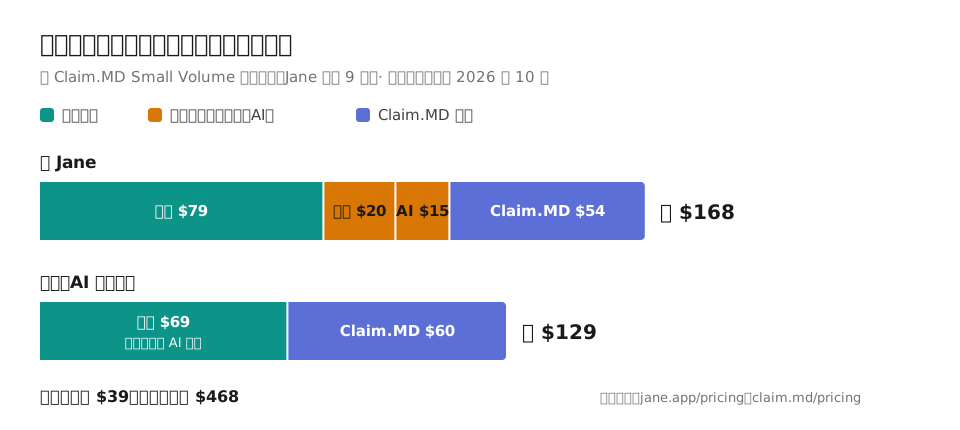
| Jane | Qihuang AI self-service | |
|---|---|---|
| Software | $79 (Practice) | $69 |
| Insurance billing | +$20 (+$5 per additional full-time practitioner) | Included |
| AI charting | +$15 (AI Scribe) | AI allowance included |
| Claim.MD | +$54 ($60 list price, 10% off for Jane users per Jane's Claim.MD guide) | +$60 |
| Monthly total | About $168 | About $129 |
That's about $39 less per month, or about $468 per year. To add one more practitioner: Qihuang AI adds $39, with its own AI allowance. Jane adds its per-practitioner license fee (see jane.app/pricing), plus $5 for the insurance add-on and $15 for AI.
If you want a clinic website: Jane's websites are $59/month. On Qihuang AI self-service, a new site is $599 one-time, then $59/month for upkeep, a booking page and AI agent booking (patients can book from ChatGPT or Claude). With full-service billing it is all free.
Charting: tap where you can, speak where you can
In an acupuncture clinic, the time sink often isn't the needling. It's writing the note afterward.
In Jane, you pick and adjust chart templates yourself. AI Scribe can help write the note, but Jane's AI Scribe officially supports English transcription only. Practitioners who take histories in Chinese may end up typing anyway.
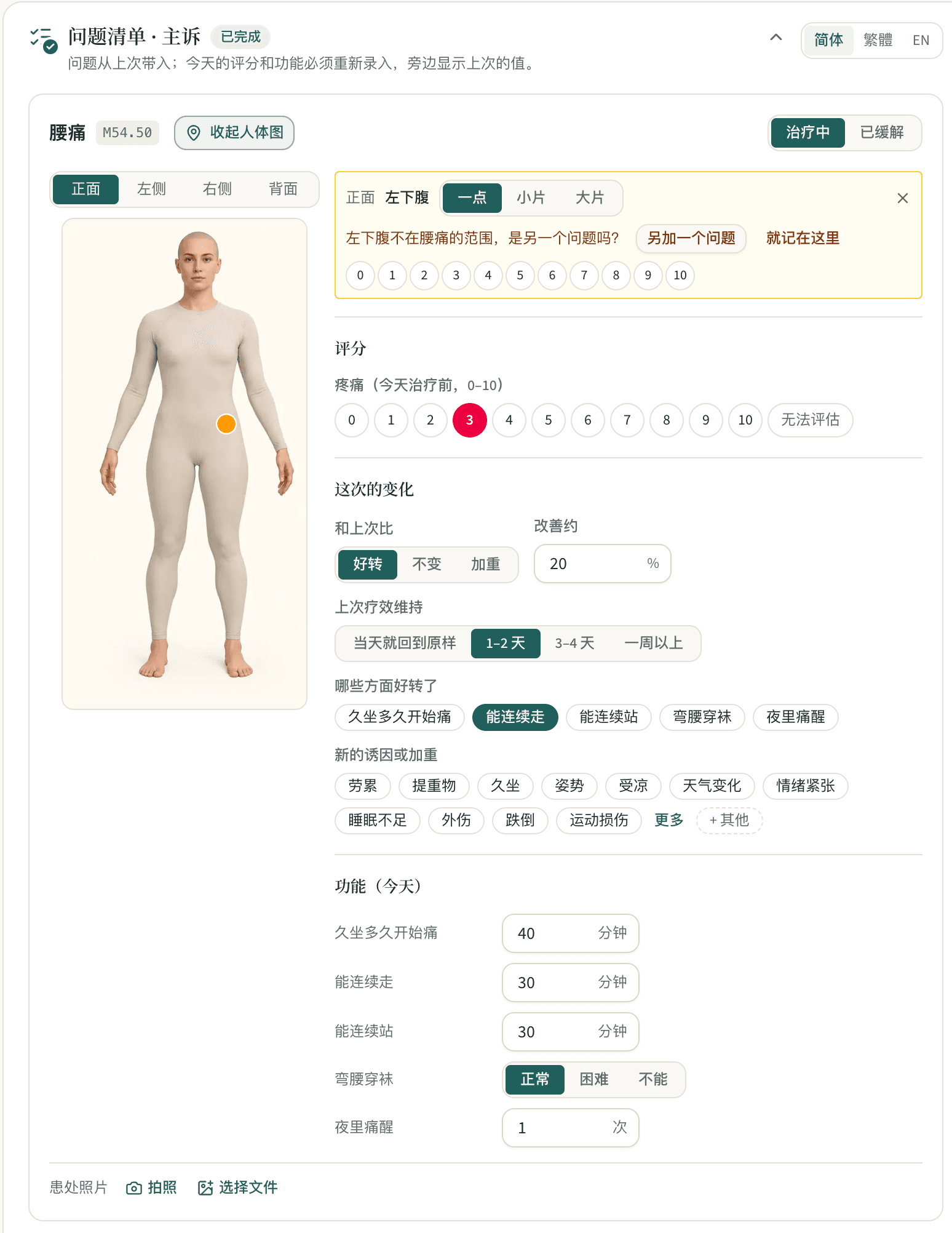
Tap: location, scores and function, all by tapping
Mark pain locations on a body chart, then give a 0–10 score. Better or worse than last visit, how long the patient can walk, whether they can bend to put on socks: all taps or a single number. On follow-up visits, problems carry over from the last visit. If a marked location doesn't match the problem, the system flags it, for example: “The left lower abdomen isn't in the low back pain area. Is this a separate problem?”
Tongue body, tongue coating and pulse are rows of tap choices. Palpation findings come from a dropdown. No typing.
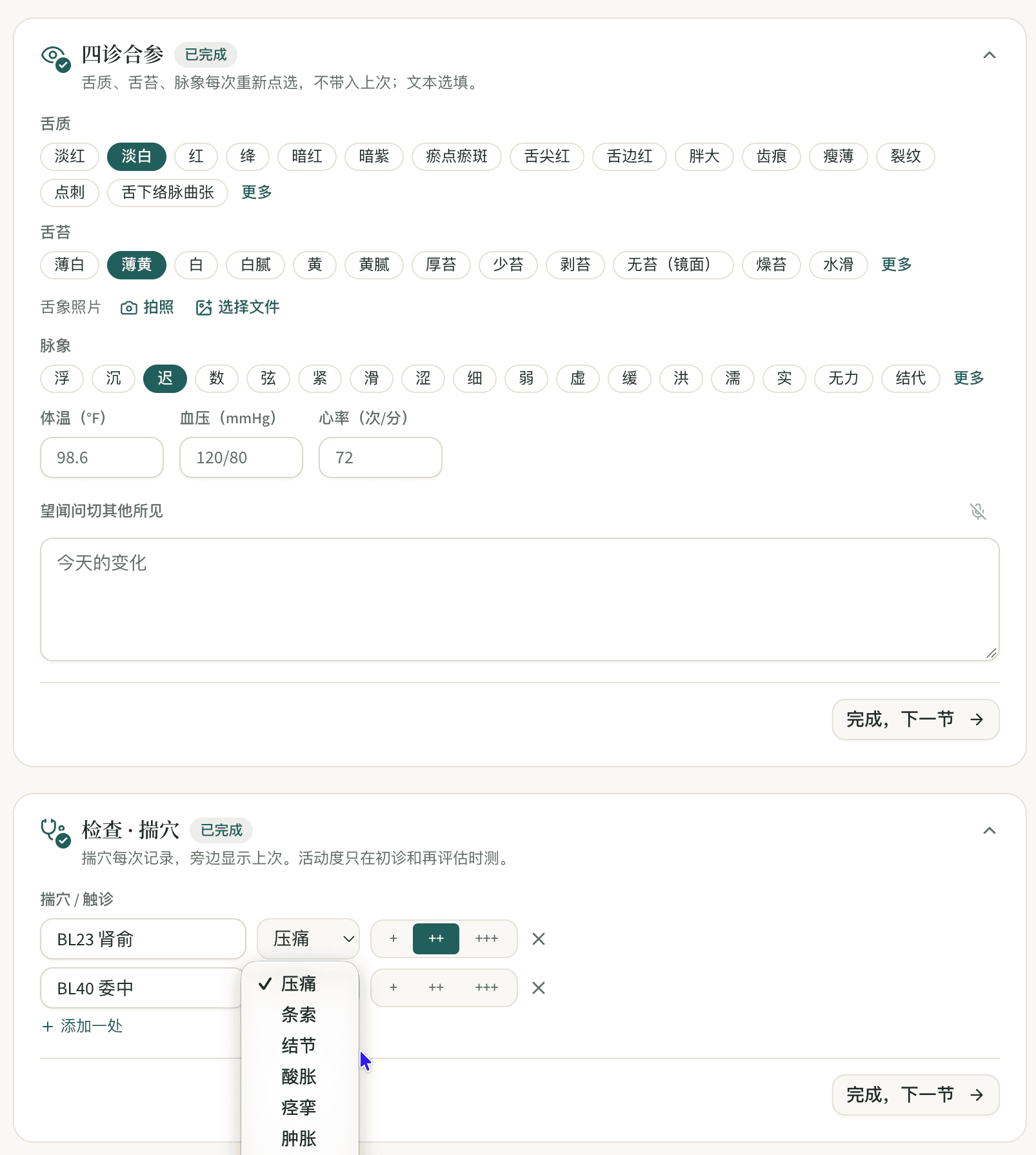
Speak: talk into the mic and the system turns it into chart notes
The four examinations, SOAP and chief complaint fields each have a microphone button. Press it and talk, in Mandarin, English or Korean, and the system turns what you said into clinical wording and fills it in.
AI pattern differentiation: patterns, point prescriptions and code suggestions
Once the four examinations and palpation are filled in, one click gives you AI-suggested patterns with the reasoning for each, plus a treatment principle, a point prescription, and ICD-10 and CPT suggestions. Where information is missing, it lists what else to ask. All of this is only a reference. Nothing counts until the practitioner clicks “Adopt”.
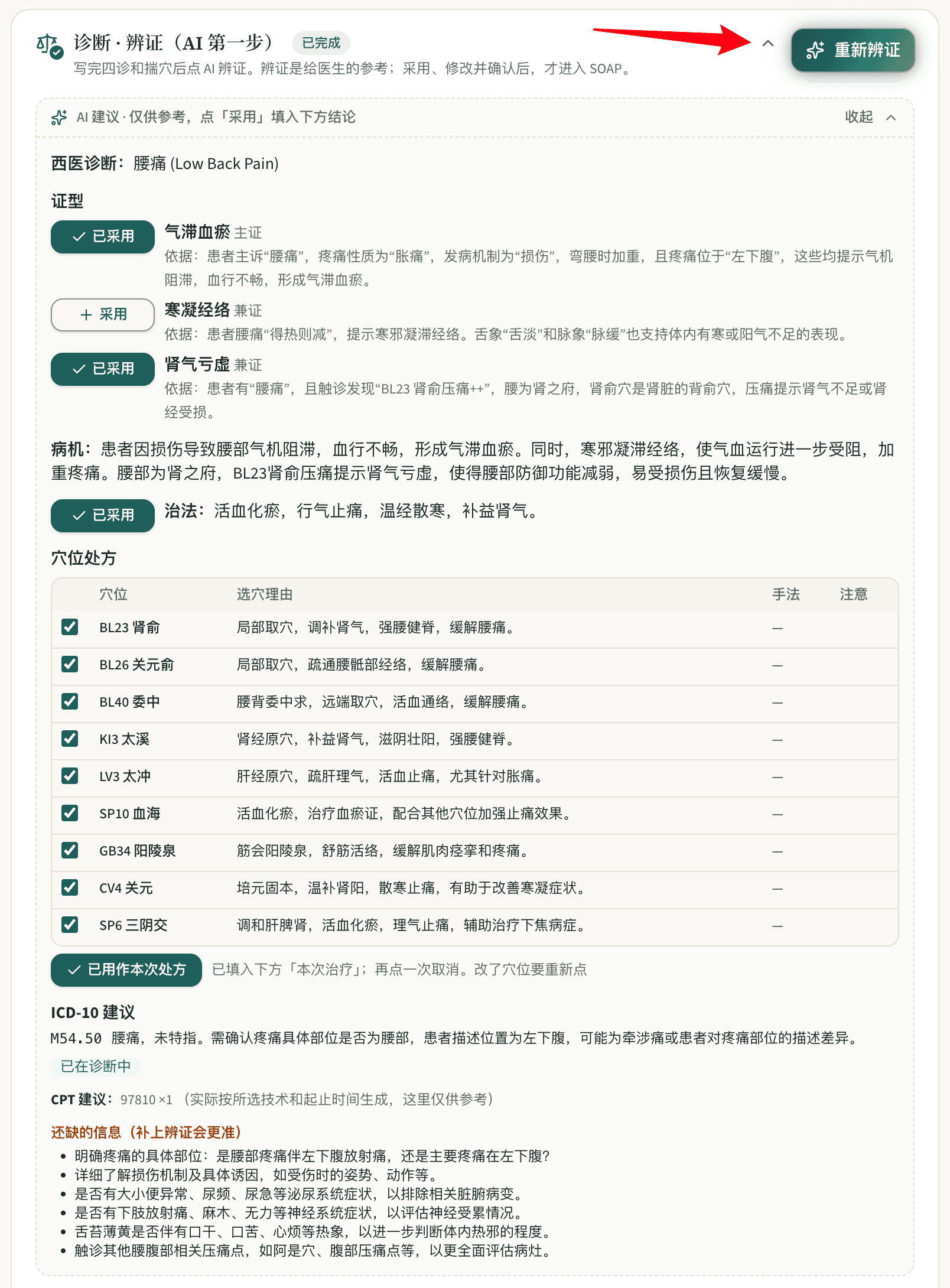
AI SOAP notes: tap in Chinese, get an English note
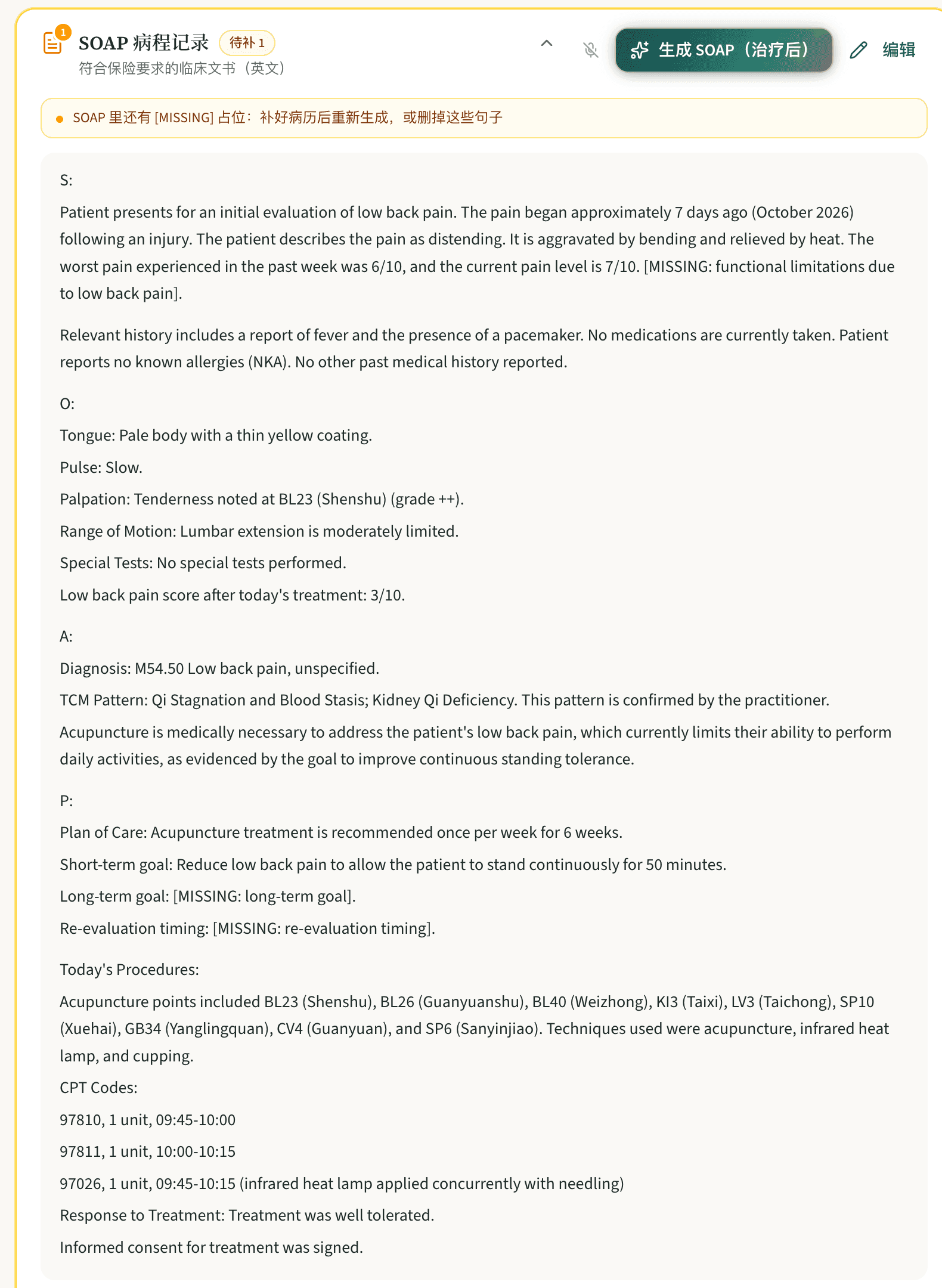
After treatment, one click and the AI writes an English SOAP note from what you tapped. Diagnosis codes, CPT codes and treatment time are all in the note, and they match the claim. It's designed to flag anything insurance needs that is missing as [MISSING] rather than guess, so you can fill it in. The practitioner still reviews the note.
Who does the insurance billing work?
When you bill insurance through Jane, all of this falls on your clinic:
- Sign up with Claim.MD, then enroll for electronic claims and electronic remittance advice (ERA) with each insurance company one by one. Some take 5 to 30 days.
- Set up Jane's connection to Claim.MD. Claims and eligibility checks are two separate connections, each set up on its own.
- Choose the diagnosis codes (ICD-10) and treatment codes (CPT) and fill out the claim form for every claim.
- When a claim is denied, read the denial reason in English, fix it and resubmit.
- Reconcile and post every payment yourself.
Jane gives you a set of tools, but you still do the work. In a clinic without a dedicated biller, that work ends up with the practitioner after hours, or on the front desk.
| Jane | Qihuang AI self-service | Qihuang AI full-service billing | |
|---|---|---|---|
| Seeing patients, charting | You | You (tapping, voice, AI help) | You |
| Account setup and payer enrollment | You | You (with a step-by-step guide), or we do it for you; free with an annual plan | Us |
| Choosing codes, filling the claim form | You, typing “#” to search codes | AI fills it in first, you check it | Us |
| Submitting | You | You click once | Us |
| Reviewing denials, fixing, resubmitting | You | You, with the denial reason shown on the matching field | Us |
| Payment reconciliation | You | You, checking the ERA on the claim | Us |
With Qihuang AI self-service
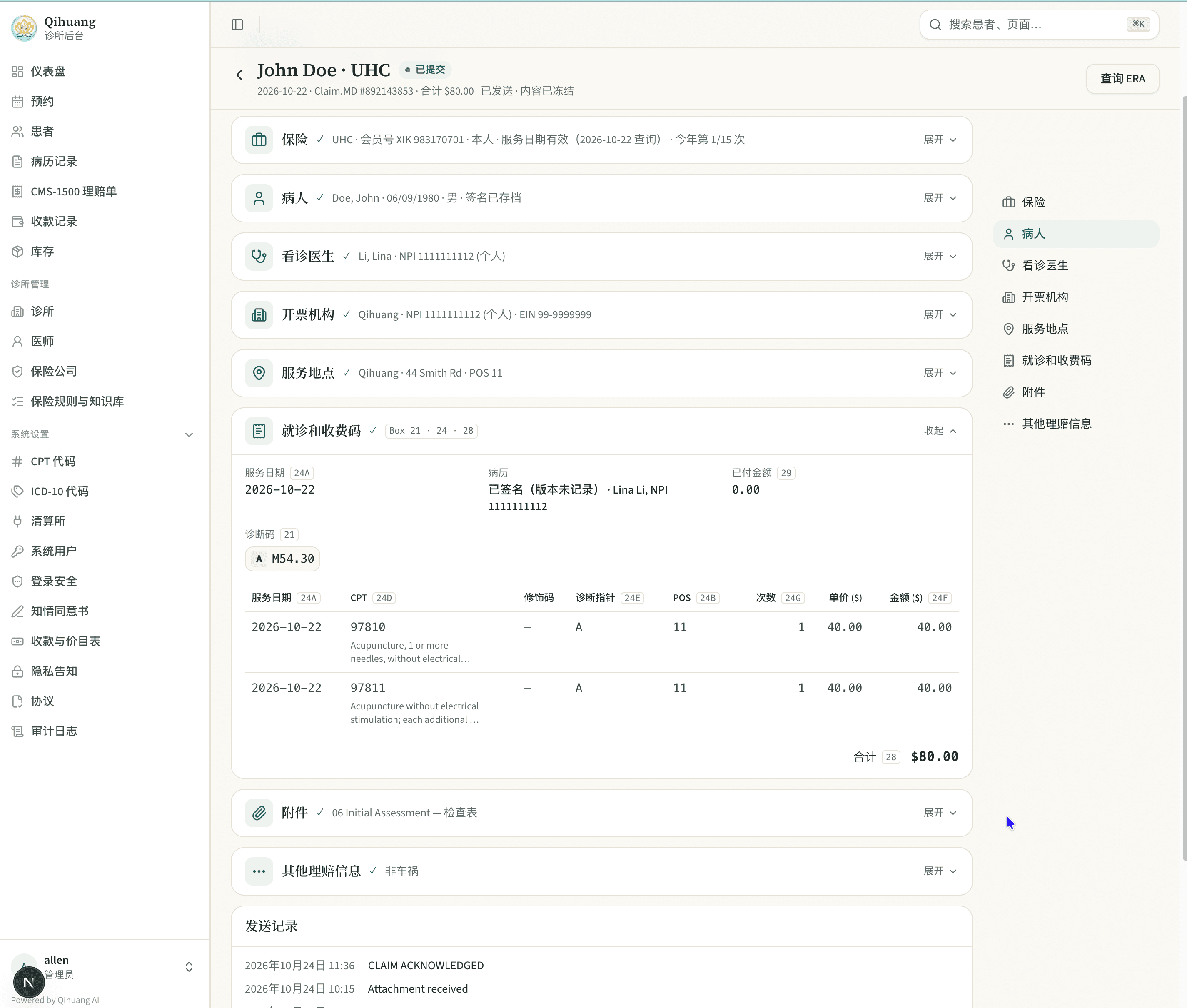
Codes are set while you chart, so the codes in the note match the claim. The CMS-1500 claim form is built directly from the chart. You check it and submit with one click. If it's denied, the denial reason is shown on the matching field of the claim form. If you don't understand it, just ask us, in Chinese if that's easier.
On the claim, the eligibility check result (including which visit this is out of the acupuncture visits the plan allows this year), diagnosis codes, CPT codes and amounts are laid out by CMS-1500 field, and the chart attachment is on the same claim. After you submit, the send history shows when the payer received the claim and when it received the attachment.
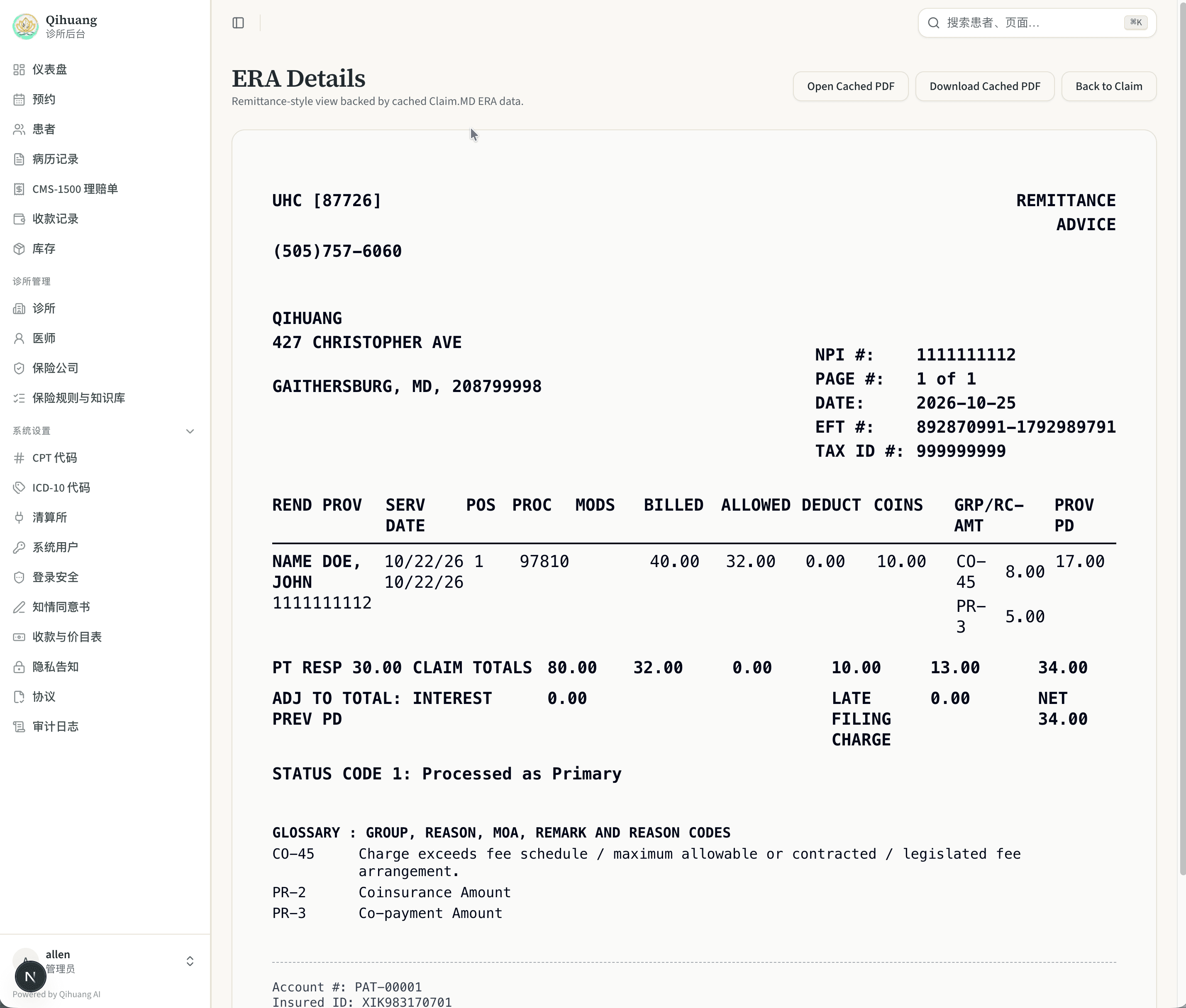
When the payment comes in, click “Check ERA” on the same claim to see what insurance paid, what the patient owes and why the amount was reduced.
With Qihuang AI full-service billing
We handle coding, submission, follow-up, denial fixes and payment reconciliation. We can also handle insurance credentialing.
- Fee: 7% of what insurance actually pays, with a $299/month minimum. Patient copays and self-pay don't count.
- The full clinic system is included, with no separate software fee.
- 3-month minimum. We don't currently bill Medicare or Medicaid.
Jane doesn't offer billing services itself. It does keep a directory of U.S. billers, but you find and hire the biller yourself.
Self-service or full-service: how to choose
Two quick calculations settle it. First, the full-service break-even point: $299 ÷ 7% ≈ $4,271. If insurance pays you less than about $4,271 a month, you pay the $299 minimum. Above that, you pay 7%. Second, the real cost of billing yourself: hours per week spent on claims, times the hourly pay of whoever does it. For example, if your front desk spends 5 hours a week on claims at $20 an hour, that's about $430 a month, before counting the money stuck in denied claims.
- Someone at the clinic knows billing and has time for it: choose self-service, from $69/month.
- No one knows billing, or the practitioner is doing claims after hours: choose full-service billing and use that time to see more patients.
What you might miss about Jane
To be fair, Jane's online booking is very good. Booking online is smooth for patients, rescheduling is easy, and support calls back quickly. If your clinic also offers massage or chiropractic, or relies heavily on text reminders, telehealth, or packages and memberships, Jane covers more than Qihuang AI does. If Qihuang AI doesn't have a feature yet, clinics can ask for it and we'll build it to fit the clinic's needs.
Qihuang AI's front-desk features are lean. They cover what an acupuncture clinic uses every day: online booking (in four languages), email confirmations and day-before reminders, separate schedules for each practitioner, managing several clinics together, and patients signing consent forms electronically on a tablet.
Before you choose a system, run these three tests yourself
Don't rely only on a sales pitch, and don't rely only on this article. Spend an afternoon running three tests with your own clinic's situation. That beats any review:
- Timing test: make up a test patient and go from creating the record, through charting, to submitting a claim. Time each system. Don't look at tutorials or call support along the way. Write down every place you get stuck.
- Weakest-user test: have the practitioner at your clinic who is least comfortable with computers and with English write a complete note alone. If they can finish it, everyone at the clinic can use the system.
- Cost test: add up monthly software, the insurance add-on, AI, website and Claim.MD. Do it twice: once for your current number of practitioners and once for the number you plan to have a year from now.
Jane has a demo account, and you can book a demo of Qihuang AI. Both are free to try.
Is switching systems a hassle?
- Finish old claims in Jane: claims already submitted but not yet closed stay in Jane until they're resolved. New visits are submitted from Qihuang AI, so nothing is billed twice.
- Export your data first: export patient records and past charts from Jane and store them as HIPAA (the U.S. health privacy law) requires.
- Keep using Claim.MD: if you already use Claim.MD, enter your API key in Qihuang AI to connect.
Jane vs Qihuang AI at a glance
| Jane App | Qihuang AI | |
|---|---|---|
| Built for | Many kinds of clinics | Acupuncture and TCM clinics only |
| Learning curve | Many features; expect a learning curve on first use | Follows the order of an acupuncture visit |
| Billing codes | Type “#” in the chart, search in English and pick yourself | Tapping a condition brings up the ICD-10; AI suggests CPT |
| Charting | General templates you adjust yourself; AI Scribe supports English only | Body chart tapping; voice input in Chinese, English and Korean |
| Insurance billing | Separate add-on, from $20/month; not available on the $59 plan | Included in $69 |
| Each added practitioner | License fee + $5 insurance add-on + $15 AI | +$39, including an AI allowance |
| Clinic website | $59/month | Self-service: $599 one-time build + $59/month, AI agent booking included; free with full-service billing |
| Billing service | None of its own; Jane lists outside billers in a U.S. biller directory | Yes, 7% of what insurance actually pays |
| Interface languages | No Chinese option | Simplified Chinese, Traditional Chinese, English, Korean |
| Online booking | Very strong | Yes, in four languages |
| Customization | Standard product; adjust it yourself with the template tools | Can be customized further to fit the clinic and grows with it |
Information as of October 2026. Check each company's website for current pricing.
Frequently asked questions
- Is Jane a good fit for a new acupuncture clinic?
- We don't really recommend it. Jane has a lot of features and takes time to learn, and insurance billing, AI and added practitioners all cost extra. A new clinic will have an easier time with an acupuncture-specific system with simple pricing.
- How much does Jane cost per month in total to bill U.S. insurance?
- About $168/month for one full-time practitioner: $79 for the software, $20 for the insurance add-on, $15 for AI charting and $54 for Claim.MD ($60 list price, 10% off for Jane users per Jane's Claim.MD guide). Without AI charting, about $153. Each additional practitioner adds Jane's per-practitioner license fee (see jane.app/pricing), plus $5 for the insurance add-on and $15 for AI. Prices as of October 2026.
- Can Jane's AI write chart notes in Chinese?
- As of October 2026, Jane's AI Scribe officially supports English transcription only. Qihuang AI's voice input supports Mandarin, Traditional Chinese, English and Korean.
- Can Jane automatically pull ICD-10 and CPT codes from the chart?
- No. In Jane, the practitioner types “#” in the chart and searches by code or English keyword, then picks one. In Qihuang AI, tapping a condition brings up the ICD-10 code, and AI pattern differentiation suggests both ICD-10 and CPT codes.
- Does Jane have a Chinese interface?
- No. Qihuang AI supports Simplified Chinese, Traditional Chinese, English and Korean.
- Can Jane do my insurance billing for me?
- No. Jane doesn't offer billing itself; it has a U.S. biller directory, and you hire the biller yourself. Qihuang AI offers full-service billing for 7% of what insurance actually pays, with a $299/month minimum, and the full system is included.
- Qihuang AI self-service or full-service billing: which should I choose?
- If someone at your clinic knows billing and has time for it, choose self-service (from $69/month). If no one knows billing, or the practitioner is still doing claims after hours, choose full-service billing (7% of what insurance actually pays, $299/month minimum). If insurance pays you less than about $4,271 a month, full-service billing costs the $299 minimum.
- If I switch from Jane to Qihuang AI, what happens to my old claims?
- Claims already submitted but not yet closed are finished in Jane. New visits are submitted from Qihuang AI, so nothing is billed twice.
Sources
- Jane pricing (plans, insurance add-on, AI Scribe, Jane Websites)
- Jane help docs: AI Scribe
- Jane AI Scribe feature page
- Jane help docs: Adding CPT and diagnosis codes to charts
- Jane help docs: Integrated Claims with Claim.MD (including the 10% Claim.MD discount for Jane users)
- Jane help docs: Eligibility checks with Claim.MD
- Jane help docs: U.S. biller listing
- Jane help docs: Language and customization settings
- Claim.MD pricing
General information only, not legal, coding or billing advice. Payer policies and contracts vary and change; verify with the payer, your MAC, or a qualified advisor.
Jane, AcuBliss, Unified Practice, AcupBilling, Claim.MD and other product names mentioned here are trademarks of their respective owners. Qihuang AI is not affiliated with or endorsed by them. Prices and features are as observed on the dates noted; screenshots are from trial or demo accounts, for comparison only.
Related reading
- Unified Practice vs Qihuang AI: Built for Acupuncture, but You Fill In Every Field
- Qihuang AI vs AcuBliss: which fits your U.S. acupuncture clinic?
- Choosing an Acupuncture Billing Service: Five Options, Their Fees and Who Each Fits
- Pricing
- Acupuncture Insurance Billing, Step by Step: From Credentialing to ERA